Category Archives: eDiscovery

Predictive Coding Confusion

This article looks at a few common misconceptions and mistakes related to predictive coding and confidence intervals.

Confidence intervals vs. training set size:  You can estimate the percentage of documents in a population having some property (e.g., is the document responsive, or does it contain the word “pizza”) by taking a random sample of the documents and measuring the percentage having that property.  The confidence interval tells you how much uncertainty there is due to your measurement being made on a sample instead of the full population.  If you sample 400 documents, the 95% confidence interval is +/- 5%, meaning that 95% of the time the range from -5% to +5% around your estimate will contain the actual value for the full population.  For example, if you sample 400 documents and find that 64 are relevant (16%), there is a 95% chance that the range 11% to 21% will enclose the actual prevalence for the full document set.  To cut the size of the confidence interval in half you need four times as many documents, so a sample of 1,600 documents gives a 95% confidence interval of +/- 2.5%.  The sample size needed to achieve a confidence interval of a certain size does not depend on the number of documents in the full population (unless the sample is a substantial proportion of the entire document population, which would be strange), so sample sizes like 400 or 1,600 documents can be committed to memory and applied to any document set.

Sample sizes related to confidence intervals have nothing to do with sample sizes needed to train a predictive coding algorithm.  Confidence intervals are for estimating the number of relevant documents, but training is about teaching the system to identify which documents are relevant.  A pollster could survey 1,600 voters and estimate the number that would vote for a particular candidate to within +/- 2.5%, but that would not enable him/her to predict who some arbitrary person would vote for — that’s just a completely different problem from estimating the number of votes.  For a predictive coding system to make good predictions it needs enough training documents for it to identify the patterns that indicate relevance.  The number of documents required for training depends on the algorithm used and the difficulty of the categorization task.  To illustrate that point, consider the two categorization tasks mentioned in my previous article.  Both involve the same set of 100,000 documents and have nearly the same prevalence of relevant documents (0.986% and 1.131%), but the difficulty is very different.  I measured the optimal number of random training documents to achieve 75% recall while reviewing the smallest possible total number of documents (training + review) and found:

Training Docs Review Docs Total Docs Reviewed
Task 1 300 800 1,100
Task 2 4,500 6,500 11,000

If the number of training documents is below the optimal level, the predictions won’t be very good (low precision) and you’ll have to review an excessive number of non-relevant documents to find 75% of the relevant documents.  If the number of training documents is above the optimal level, the benefit from higher precision achieved because of the extra training won’t be sufficient to offset the cost of reviewing the additional training documents.  You can see from the table that there is a factor of 15 difference in the optimal number of training documents for the two tasks.   Unlike the number of documents needed to achieve a certain confidence interval, there is no simple answer when it comes to the number of documents needed for training.

Sampling counts documents not importance: Sampling allows you to estimate the number of relevant documents that were missed by the predictive coding algorithm.  That doesn’t tell you anything about the importance of the documents that were missed.  As discussed in my article on relevance score, predictive coding algorithms put the documents that they are most confident are relevant at the top of the list.  The documents at the top are not necessarily the most important documents for the case.  To the extent that a “smoking gun” is very different from any of the documents in the training set, the algorithm may have little confidence that it is relevant, so it may get a modest or even low relevance score.  Claims that nothing critical is lost when documents below some relevance score cutoff are culled because the number of relevant documents that are discarded is small are simply unfounded.

Beware small percentages of large numbers: Suppose that a predictive coding system identifies 30,000 documents out of a population of a million as likely to be relevant, and the vendor claims 95% precision was achieved, meaning that 95% of the documents predicted to be relevant actually are relevant.  The vendor also claims, based on sampling, that only 1% of the predictions were false negatives, meaning that the system predicted that the documents were non-relevant when they were actually relevant.  How many relevant documents were found, and how many were missed?  The number found is:

95% * 30,000 = 28,500

The number missed is (I’m over-counting a little by not subtracting out documents used for training [i.e. no prediction was made for them], which were presumably a small fraction of the full population):

1% * 1,000,000 = 10,000

The recall, the percentage of relevant documents that were actually found by the predictive coding system, is (using point estimates in a non-linear equation like this is somewhat wrong, but in this case the error is less than 1%):

28,500 / (28,500 + 10,000) = 74%

That recall might be acceptable, but it isn’t great.  The seemingly small 1% has a big impact because it applies to the entire document population, not just the relatively small number of documents that were predicted to be relevant.  That 1% was estimated using sampling, so there is uncertainty in the value (there may also be uncertainty in the 95% precision value, but I’m going to ignore that for simplicity).  If 1,600 documents were sampled and 16 were found to be false negatives, the 95% confidence interval would seem to go from -1.5% to +3.5%.  How can the percentage be negative?  It can’t.  The +/- 2.5% interval is actually designed to accommodate the worst-case scenario, which occurs when 50% of the documents have the property being measured.  When the percentage of documents having the property is very far from 50%, as is often the case in e-discovery, the 95% confidence interval is smaller and is not centered on the estimated value.  Equations for the confidence interval in such situations involve approximations that won’t always be appropriate for the examples in this article, so I’m going to recommend that you use an exact confidence interval calculator instead of dealing with equations that will give wrong results if used when they’re not appropriate.  With 95% confidence the interval is 0.57% to 1.62%, so the number of relevant documents missed is between 5,700 and 16,200 with 95% confidence.  That means the recall is between 64% and 83% with 95% confidence.

What if the vendor based the 1% false negative number on a sample of 400 documents instead of 1,600?  The confidence interval would be 0.27% to 2.54%, so the recall would be between 53% and 91% with 95% confidence (if you prefer the one-tail confidence interval, the upper bound is 2.27% giving a minimum recall of 56%).  If all we have to go on is a 1% false negative number based on a 400 document sample, we cannot assume that we’ve found much more than half of the relevant documents!  Not only does the 1% false negative number have a big impact, but it has a big error bar compared to the value itself (1% might really be 2.54%), so the worst case scenario is pretty ugly.

Beware recall values lacking confidence intervals:  Suppose the vendor claims that 98% recall was achieved in the example above.  Is that plausible in light of the 1% false negative number?  Before diving into the math, it should be said that 98% recall is very high.  The closer you get to 100% recall, the harder it is to find additional relevant documents without having to wade through a lot of non-relevant documents because all the relevant documents that are easy to identify have already been found.  Achieving 95% precision at 98% recall, as claimed, would be close to perfection.  So, how big is the error bar for that 98% recall?

Without knowing the details of how the vendor calculated the recall, let’s try to come up with something plausible.  If the vendor set aside a control set (a random sample of documents that were reviewed but not used for training) of 1,600 documents to monitor the system’s ability to make good predictions as training progressed, and  50 of those documents were relevant and the system correctly predicted that 49 were relevant (so it missed just one), the recall estimate would be 49/50 = 98%.  Turning to the confidence interval calculator and keeping in mind that our sample size is 50, not 1600, because we’re estimating the proportion of the sampled relevant documents (there are only 50) that wererecall_error_bars correctly predicted to be relevant, we find with 95% confidence the range for the recall is from  89.3% to 99.9%.  So, the claimed 98% recall might only be 89%.  The recall estimate from the control set barely overlaps with the 53% to 91% recall range implied by a false negative number of 1% based on 400 sample documents, and definitely isn’t consistent with a 1% false negative number if that number was measured using 1,600 sample documents.  Looking at it from a different angle, if 1% of predictions are false negatives and the control set contains 1,600 documents, you would expect the control set to contain about sixteen relevant documents that the system predicted were non-relevant, but a claim of 98% recall implies that there was only one such document, not sixteen.  It’s hard to see the 1% false negative number as being consistent with 98% recall.  We’ve been using a 95% confidence level, which means that 5% of the time the confidence interval we compute from the data will fail to capture the real value, so with recall estimates coming from different samples (from the control set and the sample used to measure false negatives) inconsistent results could mean that one value is simply wrong.  Which one, though?  The bottom line is that there are several ways to estimate recall, and all available numbers should be tested for consistency.  Without a confidence interval, nobody will know how meaningful the the recall estimate really is.

Fair Comparison of Predictive Coding Performance

Understandably, vendors of predictive coding software want to show off numbers indicating that their software works well.  It is important for users of such software to avoid drawing wrong conclusions from performance numbers.

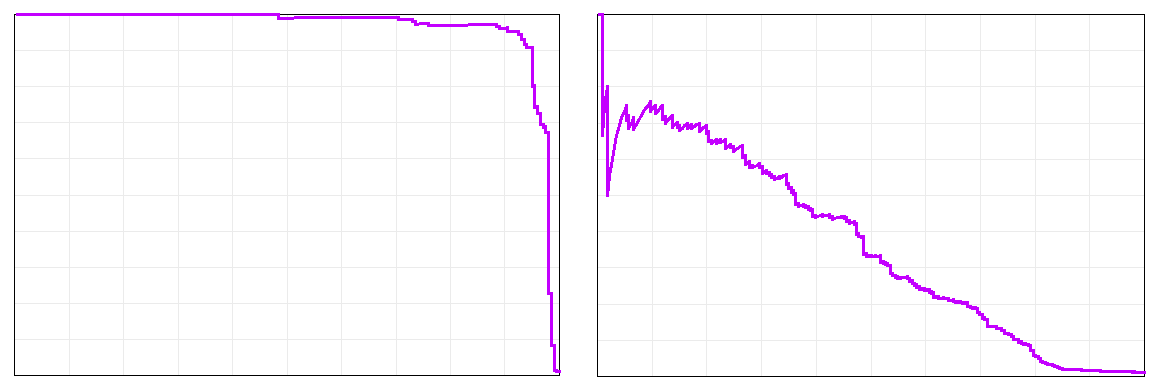
Consider the two precision-recall curves below (if you need to brush up on the meaning of precision and recall, see my earlier article):precision_recall_for_diff_tasks

The one on the left is incredibly good, with 97% precision at 90% recall.  The one on the right is not nearly as impressive, with 17% precision at 70% recall, though you could still find 70% of the relevant documents with no additional training by reviewing only the highest-rated 4.7% of the document population (excluding the documents reviewed for training and testing).

Why are the two curves so different?  They come from the same algorithm applied to the same document population with the same features (words) analyzed and the exact same random sample of documents used for training.  The only difference is the categorization task being attempted, i.e. what type of document we consider to be relevant.  Both tasks have nearly the same prevalence of relevant documents (0.986% for the left and 1.131% for the right), but the task on the left is very easy and the one on the right is a lot harder.  So, when a vendor quotes performance numbers, you need to keep in mind that they are only meaningful for the specific document set and task that they came from.  Performance for a different task or document set may be very different.  Comparing a vendor’s performance numbers to those from another source computed for a different categorization task on a different document set would be comparing apples to oranges.

Fair comparison of different predictive coding approaches is difficult, and one must be careful not to extrapolate results from any study too far.  As an analogy, consider performing experiments to determine whether fertilizer X works better than fertilizer Y.  You might plant marigolds in each fertilizer, apply the same amount of water and sunlight, and measure plant growth.  In other words, keep everything the same except the fertilizer.  That would give a result that applies to marigolds with the specific amount of sunlight and water used.  Would the same result occur for carrots?  You might take several different types of plants and apply the same experiment to each to see if there is a consistent winner.  What if more water was used?  Maybe fertilizer X works better for modest watering (it absorbs and retains water better) and fertilizer Y works better for heavy watering.  You might want to present results for different amounts of water so people could choose the optimal fertilizer for the amount of rainfall in their locations.  Or, you might determine the optimal amount of water for each, and declare the fertilizer that gives the most growth with its optimal amount of water the winner, which is useful only if gardeners/farmers can adjust water delivery.  The number of experiments required to cover every possibility grows exponentially with the number of parameters that can be adjusted.

Predictive coding is more complicated because there are more interdependent parts that can be varied.  Comparing classification algorithms on one document set may give a result that doesn’t apply to others, so you might test on several document sets (some with long documents, some with short, some with high prevalence, some with low, etc.), much like testing fertilizer on several types of plants, but that still doesn’t guarantee that a consistent winner will perform best on some untested set of documents.  Does a different algorithm win if the amount of training data is higher/lower, similar to a different fertilizer winning if the amount of water is changed?  What if the nature of the training data (e.g., random sample vs. active learning) is changed?  The training approach can impact different classification algorithms differently (e.g., an active learning algorithm can be optimized for a specific classification algorithm), making the results from a study on one classification algorithm inapplicable to a different algorithm.  When comparing two classification algorithms where one is known to perform poorly for high-dimensional data, should you use feature selection techniques to reduce the dimensionality of the data for that algorithm under the theory that that is how it would be used in practice, but knowing that any poor performance may come from removing an important feature rather than from a failure of the classification algorithm itself?

What you definitely should not do is plant a cactus in fertilizer X and a sunflower in fertilizer Y and compare the growth rates to draw a conclusion about which fertilizer is better.  Likewise, you should not compare predictive coding performance numbers that came from different document sets or categorization tasks.

Highlights from the ACEDS 2014 E-Discovery Conference

aceds_2014_reception The ACEDS E-Discovery Conference was a well-organized conference at a nice venue with two full days of informative sessions.  Copies of all slides were provided to attendees, so my note-taking was mostly limited to things that weren’t on the slides, and reflects only a tiny fraction of the information presented.  Also, there were sometimes two simultaneous sessions, so I couldn’t attend everything.  If you attended, please let me know if you notice any errors in my notes below.

  • There is some reluctance to use TAR (technology-assisted review) due to a fear that disclosure of the seed set, including privileged and non-responsive documents, will be required.
  • aceds_2014_breakfastRoyce Cohen said there was a recent case where documents couldn’t be clawed back in spite of having a clawback agreement because attorneys’ eyes had not been put on the produced documents.
  • A few years ago, use of TAR was typically disclosed, but today very few are disclosing it.
  • Regarding the requirement for specificity rather than boilerplate in e-discovery objections, Judge Waxse recommended that everyone read the Mancia v. Mayflower Textile Services opinion by Judge Grimm.
  • Judge Waxse said he resolves e-discovery disputes by putting the parties in a room with a video camera.  “Like particles in physics, when lawyers are observed their behavior changes.”
  • The tension between e-discovery cooperation and zealous advocacy of clients was discussed.  It was pointed out that the ABA removed “zealous” from the Model Rules of Professional Conduct (aside from the preamble) in 1983 (sidenote: related article).  John Barkett noted that the Federal Rules of Civil Procedure (FRCP) trump ethics rules, anyway.
  • The preservation trigger is unchanged in the proposed changed to the FRCP.
  • Stephen Burbank said that if the changes to the FRCP get to Congress, blocking them would require legislation by Congress.  It is unlikely the divided Congress would get together to pass such legislation.
  • Judge Waxse said he didn’t think the proposed changes to the FRCP would have a significant impact on proportionality.  The problem with proportionality is not where it is located in the rules, but the difficulty for the court to decide the importance of the case before the trial.  He also mentioned a case where one side wanted a protective order claiming e-discovery would cost $30 million, but then dropped that to $3 million when questioned, and ended up being only thousands of dollars.  He said judges talk to each other, so be careful about providing bad cost estimates.
  • On the other hand, Judge Hopkins expects a sea change on proportionality from the new rules.
  • Judges Hopkins and Otazo-Reyes both said that phasing (e.g., give one out of fifteen custodians to start) is an important tool for proportionality.
  • Judge Waxse said it is important to establish what is disputed before doing discovery since there is no point in doing discovery on things that aren’t disputed.
  • Judge Waxse said he thinks it is malpractice to not have a 502(d) order (clawback agreement) in place.
  • Judge Hopkins said that when documents are clawed back they cannot be “used,” but that is ambiguous.  They can’t be used directly in trial, but can the info they contain be used indirectly when questioning for a deposition?  Prohibiting indirect use could require changing out the litigation team.
  • aceds_2014_sessionBill Speros expressed concern that the “marketing view” of TAR (that courts have said clearly that it is OK, and that past studies have proven that it is better than linear review), which is inaccurate, may feed back into the court and distort reality.
  • Bill Speros predicted that random sampling will fail because prevalence is too low, making it hard to find things that way.  He warned that the producing party may be happy to bring in additional custodians to dilute the richness of the document set and reduce the chances of finding anything really damning.
  • Mary Mack said that predictive coding has been successfully used by receiving parties.
  • Bill Speros said we should look at concepts/words rather than counting documents to determine whether predictive coding worked.  He pointed out that a small number of documents typically contain a large amount of text, so weighting on a document basis tends to undercount the information in the long documents.
  • When trying to control e-discovery costs, some red flags are: lack of responsiveness, no clarity in billing, and lots of linear review.
  • Seth Eichenholtz warned that when dealing with international data you have to be careful about just stuffing it all onto a server in the U.S.
  • When storing e-discovery data in the cloud, be aware of HIPAA requirements if there are any medical records involved.
  • Law firms using cloud e-discovery services risk losing the connection with the client to the cloud service provider.
  • Be careful about your right to your data in the cloud, especially upon termination of the contract.
  • In one case a cloud provider had borrowed money from a bank to purchase hard drives and the bank repossessed the drives (with client data) when the cloud provider had financial trouble.
  • Be careful about what insurance companies will cover when it comes to data in the cloud.
  • With TAR, 75% recall is becoming a standard acceptable level.
  • It’s easier to get agreement on using TAR when both sides of the dispute have a lot of documents, so both benefit from cost savings.
  • aceds_2014_ocean_viewData should have an expiration date, like milk.  If no action is taken to keep it, and there is no litigation hold, it should be deleted automatically.
  • Predictive coding allows review of the documents that are most likely to be relevant earlier, before the reviewer becomes fatigued and more likely to make mistakes.
  • Jon Talotta said some law firms internalize e-discovery (rather than outsourcing to a vendor) at no profit to keep the relationship with the client.  Some law firms make good money on e-discovery, but only because they are able to make full utilization of the capacity and they have clients that don’t have their own relationships with e-discovery service providers.
  • A survey of the audience found that most law firms represented were just passing the e-discovery cost through to the client without trying to make a profit.
  • Bill Speros said there may be ethical issues (ancillary services) around law firms trying to make a profit on e-discovery.

I want to thank Marshall Sklar for suggesting a correction to my notes.


Is Predictive Coding Overriding Lawyers?

Predictive coding tools are supposed to learn to separate relevant documents from non-relevant documents by analyzing examples in a training set provided by a human reviewer.  If you tagged a training document as relevant and asked the software to predict whether an exact duplicate or a near-dupe of the very same document was relevant, how annoyed would you be if its answer was “no”?  For many (but not all) algorithms, that’s entirely possible.

To see how that can happen, we’ll use the linear support vector machine (SVM) as an example, but the reasoning is similar for many classification algorithms.  The documents are viewed as points in a high-dimensional space, where the position of a document is determined by the frequencies of the words in the document or other features being analyzed.  This figure conveys the basic idea in two dimensions:

Linear SVM with OutliersThe linear SVM algorithm tries to find the best possible line (technically, a hyperplane when you have more than two dimensions) to separate relevant documents from non-relevant documents for the training set.  The details of how it does that don’t matter for this discussion.  The important point is that it will often be impossible to separate the relevant documents from the non-relevant documents perfectly with a line (or hyperplane) — there will be some training documents that end up on the wrong side of the line, like the orange dot toward the lower left corner of the figure above.

When the linear SVM model makes predictions for the remainder of the document set, those predictions are based solely on the line (hyperplane) that the algorithm fit to the training data.  When you ask it to make a prediction for a document, the fact that the document is extremely similar, or even identical, to one of the training documents is not taken into account.  All that matters for the prediction is where the document lies relative to the line.  So, if orange dots represent relevant documents, the prediction for a document that is a dupe or near-dupe of the outlier orange document toward the lower left corner of the figure above will be that it is not relevant (the near-dupe will be at nearly the same location as the training document in the figure).  This is not limited to linear SVM — any algorithm that cannot fit the training data perfectly will not be able to make correct predictions for near-dupes of the training documents that it couldn’t fit.  Effectively, the algorithm overrides the human reviewer’s decision for documents similar to the outlier.  That’s perfectly reasonable when an algorithm is applied to noisy data, but is it appropriate for e-discovery?

Of course, the outlier training document may have been categorized incorrectly by the human reviewer (it truly is “noise”), and the algorithm’s decision to ignore it in that case would give us a better result.  On the other hand, the human reviewer may have categorized the document correctly — there is sometimes more subtlety to understanding documents than can be captured by looking at them as points in word-frequency space.

What does this mean for defensibility?  Presumably, predictive coding users are testing the results to ensure that the number of mistakes (relevant documents that were missed) is not too large.  If the number of mistakes is small, is that sufficient even if some of the mistakes are embarrassingly bad?

It is possible to paper over this problem.  After training the classification algorithm, have it make predictions for the documents in the training set.  Identify the relevant training documents that the algorithm predicts (incorrectly) are not relevant, and flag any documents in the full population that are near-dupes (or have high conceptual similarity) of them for human review.

Note: Some have objected to my use of the words “paper over” in the previous paragraph.  My reason for putting it that way is that the underlying reason the training document was categorized incorrectly is not being addressed, and any arbitrary cutoff (e.g. manual review of documents that are at least 80% near-dupes) is going to leave some documents (e.g. 79% near-dupes) uncorrected.

Real-Time Predictive Coding

Clustify 4.0 is the first technology-assisted review tool to provide real-time predictive coding, meaning that it updates its predictions for the entire document population instantly each time a training document is reviewed.  Here is a video preview (if the streaming version doesn’t display well in your browser, click here to view the HD MP4):

The Meaning of Relevance Score

Predictive coding software analyzes documents that a human reviewer has tagged as relevant or not relevant to learn to identify relevant documents.  The software may produce a binary yes/no relevance prediction for each unreviewed document, or it may produce a relevance score.  This article aims to clear up some confusion about what the relevance score measures, which should make its importance clear.

Ralph Losey’s recent article “Relevancy Ranking is the Key Feature of Predictive Coding Software” generated some debate and controversy reflected in the readers’ comments.  To appreciate the value in producing a relevance score or ranking, rather than just a yes/no relevance prediction for each document, it is critical to understand what the relevance score really measures.

Predictive coding software that produces a relevance score allows documents to be ordered, or ranked, while software that produces a yes/no relevance prediction only allows documents to be separated into two unordered sets.  What does the ordering generated by the relevance score mean?  What causes a document to float to the top when predictive coding is applied?  The documents at the top are not the most relevant documents, contrary to misconceptions encouraged by sloppy language on the subject.  Rather, they are the documents that the algorithm thinks are most likely to be relevant.  If there is a “hot document” or a “smoking gun” in the document set, there is no reason to believe that it will be the first, or even the second document in the ordered list.  The algorithm will put the document it is most confident is relevant at the top of the list.

What gives an algorithm confidence that a document is relevant, causing it to move to the top of the list?  That depends on the algorithm.  An algorithm may have high confidence if the document is highly similar to one of the human-reviewed documents from the training set.  If the training set doesn’t contain any hot documents, it is unlikely that any hot documents in the rest of the document set will get high scores.  An algorithm may have high confidence if the document contains a particular word with high frequency (number of occurrences divided by the number of words in the document).  If presence of the word “fraud” is seen as a good indicator that the document is relevant, an algorithm may take a document using the word “fraud” frequently to have a high probability of relevance, and therefore assign a high score.  It will assign a higher score to a document saying “Fraud is not tolerated here.  Fraud will be reported to the police.” than to a document saying “If we get caught, we’re going to go to jail for fraud.”

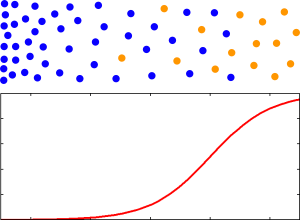
This diagram gives a reasonable, but simplified, picture of what a training set might look like to a predictive coding classification algorithm:

Document Relevance and Probability for One FeatureThe dots along the top represent documents that were reviewed by a human, with relevant documents shown in orange and non-relevant documents shown in blue.  As you move from left to right some feature that is a good indicator of relevance (meaning that it helps in distinguishing relevant documents from non-relevant documents) increases in frequency.  For example, the frequency of a word like “fraud” might increase as you go to the right.  The vertical position of the documents doesn’t matter — you can think of vertical position as specifying the frequency of a feature that is not a good indicator of relevance (e.g. the frequency of the word “office”).  The algorithm is commonly given only yes/no values for relevance as input, so it has no way of knowing whether some of the orange documents are more important than others.  What it does know is that a document has a higher probability of being relevant, assuming that the training set is representative of the document set in general, if it is farther to the right.  The algorithm might even estimate the probability of a document being relevant based on how far to the right it is, as shown by the red curve below the dots.

When the algorithm is asked to make predictions for a document that has not been reviewed by a human, it can measure the frequency of the indicator word (e.g. “fraud”) for the document and spit out the probability estimate that was generated from the training data.  Rather than the actual probability estimate, it could use any monotonic function of the probability estimate (i.e. any quantity that increases when the probability increases) as the relevance score.

Documents with a high relevance score are the documents that have the highest probability (as far as the algorithm can tell) of being relevant.  They are the documents that the algorithm is confident are relevant.  They are the low-hanging fruit if your goal is to find the largest number of relevant documents without wading through a lot of non-relevant documents.  They are not necessarily the most informative or most relevant documents.  Rather, they are the relevant documents that are easiest for the algorithm to find.  Documents with a very low relevance score are the documents that have the lowest probability of being relevant.  What about the documents between those extremes?  Those are the documents where the algorithm just isn’t sure.  The features that the algorithm uses to separate the documents that are relevant from those that aren’t simply don’t work well for those documents.  Actual relevance for those documents may depend on words that the algorithm isn’t paying attention to, or it may depend on a very specific ordering of the words when the algorithm is ignoring word order, or it may depend on a subtle contextual detail that only a human could appreciate.

The relevance score indicates how well the algorithm understands the document based on experience with other similar documents in the training set, so it is clearly specific to the algorithm and is not an inherent property of the document.  Different algorithms will do a better/worse job of finding features that separate relevant documents from non-relevant documents, and different algorithms will do a better/worse job of modeling the probability of a document being relevant based on experience with the training set.  All of these things will impact the precision-recall curve.

At this point, the difference between an algorithm that produces a relevance score and an algorithm that produces a yes/no relevance prediction should be clear.  An algorithm that produces a score “knows what it doesn’t know,” while an algorithm that produces a yes/no doesn’t (or it knows and refuses to tell you).  An algorithm that produces a score tells you which documents it is uncertain about.  You could always convert a score to a yes/no by picking an arbitrary cutoff for the score, say 50, and proclaiming that only documents reaching that threshold are predicted to be relevant.  So, two documents with scores of 49 and 50, which might even be near-dupes, would be predicted to be non-relevant and relevant respectively.  That should make the arbitrariness of a yes/no result clear.  Whenever you produce a yes/no result, even if it doesn’t involve an explicit score and cutoff, there will be the possibility that two very similar documents will generate completely different outputs because a binary output does not allow the similarity of the inputs to be expressed.

If you are the producing party in a case, and you plan to review all documents before producing them, you can produce the largest number of responsive documents (one can certainly debate whether that is the most appropriate goal) at the lowest cost by ordering the documents by the relevance score to bring the low-hanging fruit to the top.  As you work your way down the document list, you will have to review more and more non-responsive documents for each responsive document you hope to find (think about going from right to left in the diagram above).  As described in my previous article, you can compute how many documents you’ll need to review to achieve a desired level of recall using the precision-recall curve, and the appropriate stopping point (recall level) for the case can be determined from proportionality and the cost curve.  If the algorithm produces a yes/no prediction instead of a relevance score, you won’t have a precision-recall curve, just a single precision-recall point.  The stopping point will be dictated by the software rather than proportionality and the value of the case.

Sidenote: The diagram shows the simplest possible example to illustrate the ideas in the article.  It is, in fact, so simple that it would apply equally well to a keyword search for a single word if the search algorithm used word frequency to order the search results (many do).  A more realistic example would involve many dimensions and relevance score contours that could not be achieved with a search engine, but the idea still holds — middling scores should occur for documents that reside in areas of the document space where relevant and non-relevant documents aren’t well-separated.

Highlights from the Laguna Beach eDiscovery Retreat 2013

The Laguna Beach eDiscovery Retreat is part of The eDiscovery Retreats series put together by Chris La Cour.  The venue was beautiful, with carefully maintained gardens and flowers, and a relaxing view of the ocean.  You can see all of my photos of the resort and the surrounding area here.laguna_beach

There was a reception in the garden area on Sunday night.  Monday started with a continental breakfast and a keynote address by Kimberly Newman of Walmart.  There were five hour-long time slots for sessions during the remainder of the day.  Each time slot had two simultaneous sessions to choose from.  Sessions featured several experts who were guided by questions asked by a moderator and sometimes the audience.  Lunch was held on the lawn with a view of the ocean.

My notes on the sessions I attended are below.  Keep in mind that I could only attend half of them because there were simultaneous sessions, and my notes only cover a small fraction of the information presented.

Keynote Address: eDiscovery Maturity and The Road to ASCLD Accreditation – Walmart has 50 petabytes of data, 10,000 IT associates (employees), 10 million emails per day, litigation holds on 100,000 associates, 9,000 pending claims, and typically 200 pending class actions.  Some data is on hold for a decade or more.  Should have ASCLD accreditation by November.  They hope it will reduce the risk of sanctions and establish good faith efforts.  They block access to social networks from corporate computers.  Processes are different overseas due to differing laws (e.g., ownership of email).

Implementing a Successful In-House eDiscovery Program or Strategy – Difficult if you don’t have support from top management.  Having a crisis is the quick way to get buy-in.  Pfizer has a specific contact for each outside counsel and meetings to discuss e-discovery initiatives.  Chevron chooses e-discovery systems and requires outside counsel to use them.  They have written expectations for outside counsel.  Google is careful to not allow outside counsel to do things that have implications down the road.  Use service providers because the cost of keeping stuff behind the firewall is huge.  Regarding the service provider relationship, Chevron has a long vetting process, and gives them data and tests the result.  Will the provider be around in three years?  Have an SLA and a good contract.  Establish a single point of contact.  Make sure billing systems can match up.  Pfizer is asking for fixed fee (not per-GB).  Kia looks at references.  Important to compare apples-to-apples on price — send pricing spreadsheet to vendors.  Google wants vendors to tell them right away if there is any problem.laguna_seminar

A Frank Conversation About the Meaning of Possession, Custody & Control – did not attend.

Organizing the Best eDiscovery “Team” – did not attend.

eDiscovery Goals – Don’t forget about the info your own client has.  72% of e-discovery is review.  Less than 1% (or was it 0.1%?) of produced documents are marked for exhibit.  Story of a firm that gave 1,200 requests for production (trying to harass into settlement).  Another story of a firm that was sanctioned for overproducing to overwhelm the opponent.  Don’t wait until the 26(f) to do due diligence.  Cooperation may mean educating the other side.  Judges don’t like discovery motions.

Ethics & Malpractice – did not attend.

EDD Project Management & Team Roles – More is being done in-house, so outside counsel has less knowledge about the case, which makes strategy hard.  Outside counsel must certify the result, so communication is important.  Company may contract with vendor directly to negotiate a price for e-discovery services (but outside counsel may have more knowledge about pricing in the market), so outside counsel may have to learn the chosen vendor’s process.  Document review performed by a staffing agency can also result in outside counsel having less info about the case.  Choose reviewers based on their expertise (privilege, pharmaceuticals, etc.).  Look at reviewer speed — are they going too fast or too slow?  Maybe they are not really trying, or are confused, or maybe they happen to be getting especially long/short documents.

Lit Holds & Collection – did not attend.laguna_resort

Search/Coding (Including Predictive Coding)/Analysis – I was on the panel, so I did not take notes.

Evolving Challenges in Electronic Discovery and Computer Forensics – If you don’t collect early, you may lose the opportunity to do it later (e.g., you can’t just copy a NAS).  Collecting from Dropbox or iCloud – must be careful about ownership (personal vs. corporate).  Dropbox stores encrypted cache on local computer.  Dropbox keeps history log showing accesses – might find deletions.  Use metadata to show that email or office document was forged.  PDFs may retain info (botched redaction – just remove the black square hiding the text).  Time stomping is changing the creation time for a file.  Suspect time stomping when many of the documents have “000” for the milliseconds part of the time.  Shellbags capture information about what is seen in Windows Explorer.

Use of Discovery Data – did not attend.

What is a near-dupe, really?

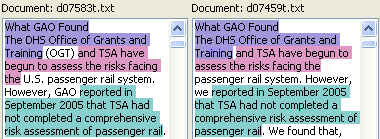
When you try to quantify how similar near-duplicates are, there are several subtleties that arise.  This article looks at three reasonable, but different, ways of defining the near-dupe similarity between two documents.  It also explains the popular MinHash algorithm, and shows that its results may surprise you in some circumstances.document_comparison_toolNear-duplicates are documents that are nearly, but not exactly, the same.  They could be different revisions of a memo where a few typos were fixed or a few sentences were added.  They could be an original email and a reply that quotes the original and adds a few sentences.  They could be a Microsoft Word document and a printout of the same document that was scanned and OCRed with a few words not matching due to OCR errors.  For e-discovery we want to group near-duplicates together, rather than discarding near-dupes as we might discard exact duplicates, since the small differences between near-dupes of responsive documents might reveal important information.  Ideally, the document review software will display the near-dupes side-by-side with common text highlighted, as shown in the figure above, so reviewers don’t waste time reading the same text over and over.  Typically, you’ll need to provide the near-dupe software with a threshold indicating how similar you want the documents to be in order for them to be grouped together.  So, the software needs a concrete way to generate a number, say between 0 and 100%, measuring how similar two documents are.  In this article we’ll look at some sensible ways of defining the near-dupe similarity.
The first two methods for measuring similarity involve identifying matching chunks of text in the documents.  Suppose we have two documents with the shorter document having length S, measured by counting words (it would be more proper to say “tokens” instead of “words” since we might count numbers appearing in the text, too), and the longer document having length L.  We identify substantial chunks of text (not just an isolated word or two) that the two documents have in common, and find the number of words in the common text that the documents share to be C.  We could define the near-dupe similarity of the two documents to be (SL is the similarity, not to be confused with S, the length of the shorter document):

S_L = \frac{C}{L}

Since the number of words the documents have in common, C, cannot be larger than the number of words in either document, the ratio C/L is between 0 and 1 (the ratio C/S is also between 0 and 1, but you could have C/S=1 for documents of wildly different lengths if the short document is contained within the long one, so we don’t consider C/S to be a good measure for near-dupes, although it might be useful for other purposes).  We can multiply by 100 to turn it into a percentage.  Suppose we measure SL to be 80% for a pair of documents.  That tells us that if we read either document we’ve read at least 80% of the content from the other document, so SL has a very practical meaning when it comes to making decisions about which documents you need to review.  SL does have a shortcoming, however.  It doesn’t depend on the length of the shorter document at all.  If three documents have the same text in common, the value of SL will be the same when comparing the longest document to either of the two shorter ones, giving no hint that one of the shorter documents may contain more unique (not shared with the longest document) text than the other.

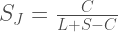
A different way of measuring the similarity is inspired by the Jaccard index from set theory:
S_J = \frac{C}{L+S-C}

The denominator may look a little strange, but it is just the amount of unique text contained in the combination of both documents.  L+S is the total amount of text, but that counts the common chunks of text shared by both documents twice, so we subtract C to compensate for that double-counting.  SJ is between 0 and 1.  Note that SJ ≤ SL because the denominator for SJ is never smaller than the denominator for SL.  To see that, note that the denominator for SJ has an extra SC compared to the denominator for SL, and SC is always greater than or equal to 0 because the amount of text the documents have in common is at most the length of the shorter document, i.e. S ≥ C.  So, SJ is a somewhat pessimistic measure of how much the documents have in common.  Let’s look at an example:

example1

Example 1: Highlighted text is identical, so we don’t need to read it twice during review.  L=100, S=97, C=85.

In Example 1 above, there are two chunks of text that match, one highlighted in orange and the other highlighted in blue.  The matching chunks are separated by a single word where a typo was corrected (“too” and “to” don’t match).  We have L=100, S=97, and C=85.  Using the equations above we compute the two similarity measures to be SL=85% and SJ=76%.

Example 1 was pretty straightforward.  Let’s consider a more challenging example:

Example 2: The document on the right is just two copies of the document on the left pasted together.

Example 2: The document on the right is just two copies of the document on the left pasted together.

In Example 2, the document on the right contains two copies of the text from the document on the left pasted together.  Forget the formulas and answer this question: What result would you want the software to give for the near-dupe similarity of these two documents?  One approach, which I will call literal matching, requires a one-to-one matching of the actual text.  It would view these documents as being 50% similar because only half of the document on the right matches up with text from the document on the left (SL and SJ are equal when all of the text from the short document matches with the long document, so there is no need to specify which similarity measure is being discussed in this case).  A different approach, which I will call information matching, views these documents as a 100% match because duplicated chunks of text within the same document aren’t counted since they don’t add any new information.  It’s as if the second copy of the sentence in the document on the right doesn’t exist because it adds nothing new to the document.  You may be thinking that Example 2 is rather contrived, but repeated text within a document can happen if spreadsheets or computer-generated reports contain the same heading repeated on many different pages.  So, what do you think is the most sensible approach for e-discovery purposes, literal matching or information matching?  We’ll return to this issue later.

I said earlier that we are looking for “substantial” chunks of text that match between near-dupe documents, but I wasn’t explicit about what that means.  I’m going to take it to mean at least five consecutive matching words for the remainder of this article.  Five is an arbitrary choice that is not necessarily optimal, but it will suffice for the examples presented.

example3

Example 3: Two potential matching chunks of text overlap in the document on the left. L=15, S=9, C=?

In Example 3, there are two 5-word-long chunks of text that could match between the two documents, but they overlap in the document on the left.  The literal matching approach would say there are 5 words in common because matching “I will need money and” takes that chunk of words off the table for any further matching, leaving only 4 words (“cigars for the mayor”) remaining, which isn’t enough for a 5-word-long match.  The information matching approach would say there are 9 words in common because all of the words in the document on the left are present in the document on the right in sufficiently large chunks.

So far, we’ve focused on similarity measures that require identification of matching chunks of text, but that can be algorithmically difficult.  The third approach we’ll consider bases the similarity on counting shingles, i.e. overlapping contiguous sets of words of a specific length.  The shingle-counting approach allows for use of a probabilistic trick called the MinHash algorithm to reduce memory consumption and speed up the calculation.  I’ve seen virtually no discussion of the near-dupe algorithms used in e-discovery, but I suspect that shingling and MinHash are used by many tools because the approach is efficient and well-known (Clustify does not use this approach).  MinHash is often discussed in the context of finding near-dupes of webpages.  If you did a search on Google you would not want to see hundreds copies of the same Associated Press article that was syndicated to hundreds of websites (with slightly different header/footer text on each webpage) in the results, so search engines discard near-dupes.  E-discovery can involve documents that are much shorter than webpages (e.g., emails), and the goal is to group near-dupes rather than discard them, so one should not assume that algorithms or minimum similarity thresholds designed for web search engines are appropriate for e-discovery.

To see what shingles look like, here are the 5-word shingles (there are 93 of them) for the document on the left in Example 1:

1 It is important to use
2 is important to use available
3 important to use available technologies
4 to use available technologies to
  …
92 LLP and an expert on
93 and an expert on ediscovery

To compute the similarity, generate the shingles for the two documents being compared and count the number of shingles that are common to both documents and the total number of unique shingles across both documents and use the formula:

S_R = \frac{\text{number of shingles in common}}{\text{total unique shingles}}

This is sometimes called the resemblance.  Using 5-word shingles ensures that matching chunks of text must be at least five words long to contribute to the similarity.  When counting shingles containing w words it is useful to note that a chunk of text containing N words will have N-(w-1) shingles.  For the sake of comparison, it is useful to write SR in terms of the same word counts used in our other similarity measures.  If the documents being compared have n chunks of text in common, we find the relationship:

S_R = \frac{C - n\times(w-1)}{L+S-C+(n-2)\times(w-1)} = S_J \times \left[\frac{1-\frac{n\times(w-1)}{C}}{1 + \frac{(n-2)\times(w-1)}{L+S-C}}\right]

The mess in square brackets in the rightmost part of the equation can be shown to be less than or equal to one (the proof is trivial for all cases except n=1, which is still pretty easy when you realize that C ≤ L+SC).  It is important to note that if we use the MinHash algorithm it will be impossible know n, so we cannot use the equation above to convert MinHash measurements of SR into SJ — we are stuck with SR as our similarity measure if we use MinHash.  The relationship between our three similarity measures is:

S_R \le S_J \le S_L

Let’s compute SR for Example 1.  We have n=2, w=5, L=100, S=97, and C=85, giving SR=69% (compared to SJ=76% and SL=85%).  As you can see, it is important to know how the similarity is calculated when choosing a similarity threshold since values can vary significantly depending on the algorithm.

How bad can the disagreement between similarity measures be?  The equation shows that SR differs from SJ most significantly when the average size of a matching hunk of text, C/n, is not much larger than the shingle size, w. Consider this example of an email and its reply:

Example 4: An email and its reply.  Shows that short documents give artificially small MinHash similarity.  Also shows why it is important to group near-dupes rather than discarding them.

Example 4: An email and its reply. Shows that short documents give very low similarity values when counting shingles. Also shows why it is important to group near-dupes rather than discarding them (don’t discard the confession!).

The email on the left is only five words long, so it has only one 5-word shingle.  The reply on the right adds just one more word, so it has two shingles.  We have a total of two unique shingles across both documents, and one shingle in common, so SR is 1/2=50% while SJ is 5/6=83%.  Matching the first five words in the document on the right only counts as one common shingle, while failing to match just one word (the “Yes”) in the last five words in the document on the right counts as a non-matching shingle.  This may seem like a defect, but it’s not as crazy as it might seem.  Consider the contribution to the numerator of the similarity calculation for matching chunks of text of various lengths:

Impact on Numerator of similarity
Number of Matching Words in chunk SJ SR
3 0 0
4 0 0
5 5 1
6 6 2
7 7 3
   …
100 100 96

For SJ, a match of four contiguous words counts for nothing, but a match of five words counts for five.  Such an abrupt transition could be seen as undesirable.  Shingle counting gives a much smoother transition for SR.  You could view matching with 5-word shingles as saying: “We’ll count a 5-word match for something, but we really only take a match seriously if it is considerably longer than five words.”

So far, I’ve glossed over the issue of the same shingle appearing multiple times in the same document.  We’ll see below that the MinHash algorithm effectively discards any duplicate shingles within a document.  Recalling the terminology introduced earlier, SR with MinHash is an information matching approach, not a literal matching approach.  Sort of, but not quite.  Let’s return to Example 2, where the document on the right consisted of two sentences that were identical.  The shingles covering the second sentence will be the same as those from the first sentence, so they won’t count, but the shingles that straddle the two sentences, starting toward the end of the first sentence and ending toward the beginning of the second sentence, are unique and will count.  The document on the left contains 12 shingles that are all matched by the document on the right.  The document on the right has an additional 4 shingles that straddle the boundary between the first and second sentence (e.g. “human reviewers. Predictive coding uses”), giving a total of 16 unique shingles.  So SR is 12/16=75%.  I challenged you earlier to decide what result you would want the software to give for Example 2, proposing 50% and 100% as two plausible values.  How do you feel about 75%?  If the repeated text was longer, SR would be closer to 100%.

Recall that Example 3 raised the issue of matching overlapping chunks of text.  Shingle counting will happily match text that overlaps, but you should keep in mind that shingles that straddle two different matching chunks won’t match.  There are 2 matching shingles in Example 3 (the text highlighted in orange and the text highlighted in blue).  The document on the left has 5 shingles (including the two it has in common with document on the right) and the document on the right has 11 shingles, so SR is only 2/(5+11-2)=14%.

Finally, let’s look at the MinHash algorithm.  Suppose the documents we are comparing are 3000 words long (roughly five printed pages).  If we use 5-word shingles, that’s 2996 shingles per document that we need to store and compare, which would be pretty demanding if our document sent contained millions of documents.  MinHash reduces the amount of data that must be stored and compared in exchange for giving a result that is only an approximation of SR.  Suppose we listed all of the unique shingles from the two documents we wanted to compare and picked one of the shingles at random.  What is the probability that the selected shingle would be one that is common to both documents?  You would find that probability by dividing the number of common shingles by the total number of unique singles, but that’s exactly what we defined SR to be.  So, we can estimate SR by estimating the probability that a randomly selected shingle is one that the documents share, which we can do by selecting shingles randomly and recording whether or not they are common to both documents; SR is then approximated by the number of common shingles we encountered divided by the number of shingles we sampled.  If we sample a few hundred shingles, we’ll get an estimate for SR that is accurate to within plus or minus something like 7% (whether it is 7% or some other value depends on the number of selected samples and the desired confidence level — 200 samples at 95% confidence gives plus or minus 7%).  It is tough to get the error bar on our similarity estimate much smaller than that because of the way error bars on statistically sampled values scale — to cut the error bar in half we would need four times as many samples.  You can skip forward to the concluding paragraph at this point if you don’t want to read about the gory details of the MinHash algorithm; from a user’s point of view the critical thing to know is that the result is only an estimate.

MinHash uses a method of shingle sampling that is not truly random, but it is “random looking” in all ways that matter.  The non-random aspect of the sampling is what allows it to reduce the amount of storage required.  The MinHash algorithm computes a hash value for each shingle, and selects the shingle that has the smallest hash value.  A hash function generates a number, the hash value, from a string of text in a systematic way such that the tiniest change in the text causes the hash value to be completely different.  There is no obvious pattern to the hash values for a good hash function.  For example, 50% of strings starting with the letter “a” will have a higher hash value than a string starting with the letter “b” — the hash value is not related to alphabetic ordering.  So, selecting the shingle with minimum hash value is a “random looking” choice — it’s not at all obvious in advance which shingle will be chosen, but it is not truly random since the same hash function will always choose the same shingle.  If we want to sample 200 shingles to estimate SR, we’ll need 200 different hash functions.  Here is an example of hash values from two different hash functions applied to the shingles from the left document from Example 1:

Shingle hash1 hash2
It is important to use 10419538473912939328824564064987594243 300214285342720760039511832324050800711
is important to use available 105555457340479730793594838617716806364 331180212539788074185988416231900930236
important to use available technologies 249315758303188756469411716170892733328 183376530549503672061864557636756469089
to use available technologies to 289630855896414368089666086343852687888 199563112601716758234064918560089655690
   …
LLP and an expert on 54122989796249388067356565700270998745 298602506386019811335232493333781440033
and an expert on ediscovery 191435127605053759280177207148206634957 59413317844173777786126651204968182610

As you can see, the hash values have a lot of digits.  For a good hash function, the probability of two different strings of text having the same hash value is extremely small (i.e. all of those digits really are meaningful, so the number of possible hash values is huge), so it’s pretty safe to assume that equal hash values implies identical text.  That means we don’t need to store and compare the shingles themselves — we can store and compare the hash values instead.

The final, critical step in the MinHash algorithm is to reorganize our approach to finding the shingle (across both documents) with the minimum hash value and checking to see whether or not it is common to both documents.  An equivalent approach is to find the minimum hash value for the shingles of each document separately.  If those two minimum hash values (one for each document) are equal, it means the shingle having the minimum hash value across both documents exists in both documents (remember, equal hash values implies that the text is identical).  If the two minimum hash values are different, it means the shingle having the minimum hash value across both documents exists in only one of the documents.  This is where we get our huge performance boost.  If we are comparing documents that are 3000 words long, we no longer need to store 2996 shingles (or hashes of the shingles) for each document and do a big comparison between two sets of 2996 shingles from the two documents we want to compare — we just need to compute the minimum hash value for each document once (not each time we do a comparison) and store that.  When we want to compare the documents, we just compare that stored minimum hash value to see if it is equal for the two documents.  So, our full procedure of “randomly” picking 200 shingles and measuring the percentage that appear in both documents to estimate SR (to within plus or minus 7%) boils down to finding the minimum hash value for each document for 200 different hash functions and storing those 200 minimum hash values, and estimating SR by counting the percentage of those 200 corresponding values that are equal for the two documents.  Instead of storing the full document text, we merely need to store 200 hash values (computers store numbers more compactly than you might guess from all of the digits shown in the hash values above — those hash values only require 16 bytes of memory each).

Each document from Example 1 is represented by a circle.  Shingles shown in the intersection are common to both documents.  Only a subset of shingles are shown due to space constraints.  Result of two hash functions being applied to shingles is shown with last 34 digits dropped.  Minimum hash value for each document is circled in orange.  The first hash function selects a shingle common to both documents.  The second selects a shingle that exists only in the right document (minimum hash values for the docs don't match).

Each document from Example 1 is represented by a circle. Shingles shown in the intersection are common to both documents. Only a subset of shingles are shown due to space constraints. Result of two hash functions being applied to shingles is shown with the last 34 digits of hash values dropped. Minimum hash value for each document is circled in orange. The first hash function selects a shingle common to both documents (“It is important to use”). The second hash function selects a shingle (“six years of experience in”) that exists only in the right document (minimum hash values for the individual documents don’t match).

As mentioned earlier, duplicated shingles within a document really only count once when using the MinHash algorithm.  The duplicated shingles would just result in the same hash value appearing more than once, but that has no impact on the minimum hash value that is actually used for the calculation.

In conclusion, near-dupes aren’t as simple as one might expect, and it is important to understand what your near-dupe software is doing to ensure you are setting the similarity threshold appropriately and getting the results you expect.  When doing document review with grouped near-dupes, you would like to tag all near-dupes of a non-responsive document as non-responsive without review while reviewing near-dupes of a responsive document in more detail.  If misunderstandings about how the algorithm works cause the similarity values generated by the software to be higher than you expected when you chose the similarity threshold, you risk tagging near-dupes of non-responsive documents incorrectly (grouped documents are not as similar as you expected).  If the similarity values are lower than you expected when you chose the threshold, you risk failing to group some highly similar documents together, which leads to less efficient review (extra groups to review).  We examined three different, plausible measures of near-duplicate similarity.  We found the relationship SR SJ SL, which is exemplified in our results from Example 1 where we calculated SR=69%, SJ=76% and SL=85% for a fairly normal pair of documents.  Different similarity measures can disagree more significantly for short documents or documents where the same text is duplicated many times within the same document.  We saw that the MinHash algorithm is an efficient way to estimate SR, but that estimate comes with an error bar.  For example, an estimate of 69% means that the value is really (with 200 samples and 95% confidence) somewhere between 62% and 76%.  Choosing an appropriate shingle size is important when computing SR.  Large values for SR are only possible if the average chunk of matching text is significantly longer than the shingle size, which means that it is impossible to group very short (relative to the shingle size) documents (aside from exact dupes) using SR unless the minimum similarity threshold is set very low.

If you are planning to implement minhash, you can find a useful discussion on how to generate many hash functions here.

Clustify 3.2 Features

The press release announcing Clustify 3.2 went out yesterday.  In this post I’ll talk a bit more about some of the features in the new version and provide some screenshots.

visualize_keywords

Keyword view for news articles from 2008. Lines connect words that are highly correlated. Groups of highly correlated words are given the same color to highlight main themes.

The biggest addition is the ability to export an SVG file that provides an interactive graphical visualization of the keyword and cluster relationships that can be viewed in a web browser.  This is useful for getting a quick sense of the major themes in the document set and seeing which keywords are closely related to each other.  You can configure it to link the clusters and keywords to an arbitrary URL with the ID of the clicked cluster or keyword embedded in the URL, so you can link a cluster or keyword to a browser-based review platform to display a list of documents from the clicked cluster or containing the clicked keyword.

Cluster view after clicking "Obama" from the keyword view.

Cluster view after clicking “Obama” from the keyword view. Hovering the mouse over “Hillary” highlights clusters labeled with that word.

Version 3.2 also adds the ability to export tags into virtually any database having an ODBC driver (Microsoft SQL Server, Oracle, DB2, MySQL, PostgreSQL, etc.) as additional columns.  There is one column for each exported tag, containing “y” or “n” to indicate whether that tag was applied to the document.  Tagging can be done more efficiently in Clustify than in many review platforms because you can tag entire clusters, or all clusters labeled with a particular combination of keywords, with a single mouse click or key-press.  The addition of tag export allows you to export the tags from Clustify to virtually any review platform based on a standard database.  This makes it practical to do full tagging within Clustify, or to do very crude tagging within Clustify to prioritize the documents for full review in a review platform.

The new version contains many smaller feature additions like the “Literal Jaccard” similarity function, the ability to sort clusters on any field in any context, and improvements to the algorithm for detecting email footers so they can be ignored (to avoid grouping emails together merely because they contain the same confidentiality notice).  It also adds two new command-line tools, clustify_svg_creator (create graphical visualization) and clustify_match_highlighter (create side-by-side near-dupe comparison in HTML) , to allow users to tap into Clustify’s capabilities from within other programs without the Clustify GUI getting in the way.